3d-printing
Building an LED Sports Scoreboard: Power Bugs, Permission Traps, and Other Joys
"A few months into life as an "executive" in my day job, I have noticed something."
A few months into life as an "executive" in my day job, I have noticed something. The further up the org chart you climb, the less actual building you get to do. Meetings get longer. Decks get thicker. The number of hours per week where you are alone with a problem and a keyboard, just making something work, gets squeezed down to whatever you can claw back on a Sunday afternoon. That trade-off is fine by me, and I would not undo it (love my team!). But the part of me that likes to build things and write code that still needs the thrill of making something work. So I do that at home, on weekends.
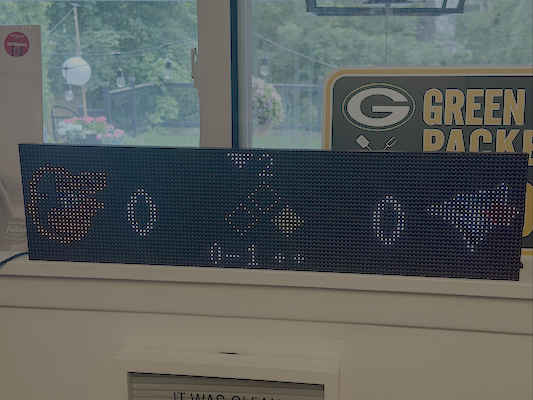
This weekend's thing was an LED sports scoreboard for the wall.
The goal was simple in concept: recreate the look of the live game card you see in a sports app on your phone. Logos at the edges, scores next to them, whatever is happening in the middle of the card in the middle. Start with the Blue Jays. Then add the Leafs. Then keep going. Put it on the wall, plug it in, and never think about it again unless someone has scored.
I am obviously not the first person to build one of these. There is an active maker community around HUB75 LED panels and it shows up in any GitHub search. But there are two reasons to do it yourself anyway. One, I learn nothing from cloning someone else's repo. Two, every house has its own quirks, and the version of the scoreboard that fits my wall, with my teams, with my polling cadence, is going to be the one I build.
The code is on GitHub at matthewmgamble/pi-scoreboard if you want to skip ahead.
The hardware
For those not familiar with the world of programmable LED panels, the cheap, bright, internet-connected version of the technology you remember from old highway signs is alive and well, and the standard is something called HUB75. You can get a 64-by-32 pixel RGB panel for about twenty dollars. Two of them chained together gives you a 128-by-32 canvas, which is roughly the shape of a sports score card. The pixels are big enough to read from across the room, which is exactly what I wanted.
The brain is a Raspberry Pi Zero 2 WH (the "WH" means it has Wi-Fi and pre-soldered headers, both of which I wanted). Between the Pi and the panels sits a small board called a HUB75 RGB Matrix HAT, which gives the Pi the dedicated GPIO and power connectors the panels need. The HAT takes power over USB-C, and at first that was the only power source for the whole thing: Pi, HAT, both panels.
That worked. Until it didn't. More on that in a minute.
The software is built on hzeller's rpi-rgb-led-matrix library, which is the standard for talking to HUB75 panels from a Pi with C/Python. Everything I wrote sits on top of that. The whole scoreboard is one Python file running in a virtual environment, started by systemd on boot.
Getting the panels to behave
First success was the simplest possible thing. About thirty lines of Python that initialize the matrix, load a bitmap font, and draw "BLUE JAYS 5" on one line and "YANKEES 3" on the line below. No data, no APIs, just two strings on the wall. It looked terrible (different colours, no logos, no game state), but it proved the panels worked and that the library could talk to them.
Then the display started flickering. Hard. The fix turned out to be a single configuration option, gpio_slowdown = 4, which slows down how fast the Pi clocks data out to the panels. The Pi Zero 2's GPIO is, apparently, a little too snappy for these particular panels at default speeds, and slowing it down stabilizes the picture. This took longer to figure out than I would like to admit. It is the kind of problem where every search result is someone else asking the same question and being told "did you try gpio_slowdown" and then disappearing without confirming if it worked.
It worked.
Real data and a preview hack worth stealing
MLB has one of the better public sports APIs on the internet, and it is free and requires no auth. A single endpoint (statsapi.mlb.com/api/v1/schedule, hydrated with the linescore) gives you everything you need to render a live game: inning, top or bottom, balls, strikes, outs, and which bases have runners on them. The NHL has a similar API, less polished but workable, with a few quirks I will come back to.
The interesting trick at this stage was not the API integration. It was figuring out how to design a layout for a 128-by-32 pixel display without having to walk over to the panels every time I changed a coordinate. The answer was a small ASCII preview harness. About a hundred lines of Python that stubs out the LED library, renders into an in-memory buffer, and prints it to the terminal as a grid of hash marks. It looks ridiculous. It is also the single most useful thing I built on this project. Every layout bug I ever had got caught in the terminal before it ever touched the actual hardware. Iterating on the physical panel is slow and frustrating. Iterating in the terminal is instant.
If you ever build for an embedded display, build the preview harness first.
The power bug that looked like a software bug
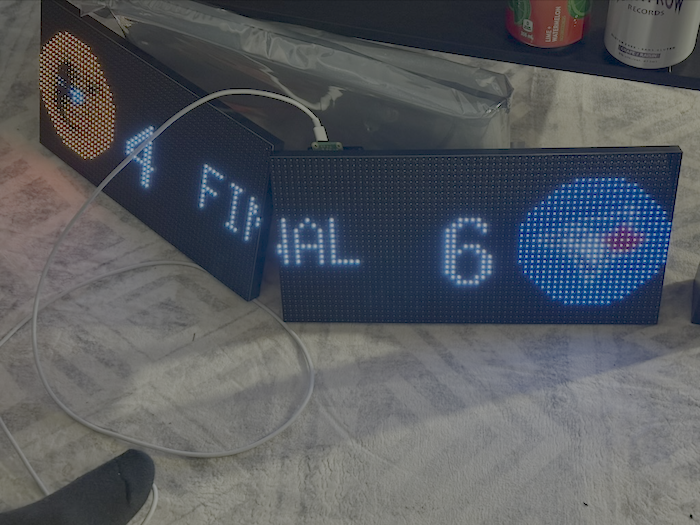
This is the war story. First real-world test with both panels lit and real game data flowing. The word "FINAL" rendered in pure white. On the screen, it came out orange on the left panel and white on the right panel. Then I cycled to a full-white test pattern and the left panel showed red.
I spent an embarrassingly long time looking at colour-mapping code and font-rendering code before the lightbulb went on. The lightbulb was a memory from electronics class.
For those not familiar with how RGB LEDs actually work, "white" is just red, green, and blue all driven at full brightness at the same time. That also happens to be the maximum current draw the panel can pull. And the three colours of LED inside each pixel do not have the same forward voltage requirement. Red is happy at about 1.9 V. Blue and green need closer to 3.2 V. So when a panel is starved for power, the rail voltage sags, and the higher-voltage LEDs (blue first, then green) drop out before the red ones do. White collapses to orange, then to red.
This was not a software bug. It was a power bug, pretending to be a software bug.
The cause was straightforward once I started looking at the wiring. The HAT was powering the first panel just fine. The second panel was being powered by daisy-chaining off the first panel's terminals, through a thin jumper wire. At low brightness, fine. At full brightness, the voltage drop across that jumper was enough to starve the second panel and trigger the brownout colour cascade.
The fix was to stop daisy-chaining the power and instead run a dedicated power feed from the supply directly to each panel. Daisy-chaining data between panels is fine and standard. Daisy-chaining power is asking for exactly this kind of failure mode. Lesson learned, and it earned its place in the lessons-learned section of the build notes.
Logos, the easy way
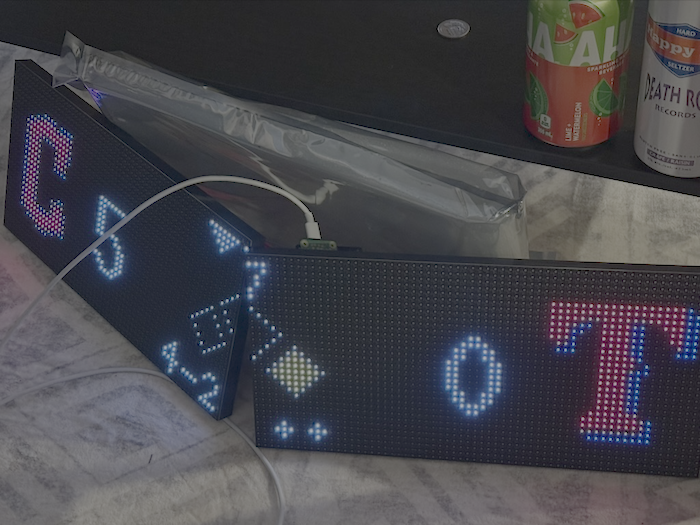
The phone-app look needs team logos. I tried two sources. MLB has an endpoint that gives you the logo inside a team-coloured circle, but on a black LED panel the coloured circle looked muddy and washed-out (see image below). ESPN's CDN gives you the same logos on a transparent background, which composites cleanly onto black panels and lets the team marks pop on the wall. I switched, cached the logos to disk on first fetch, used Pillow to resize to 24-by-24, and blitted them onto the canvas one pixel at a time, skipping anything mostly transparent.
ESPN's URL scheme uses team abbreviations, with a few annoying quirks (the White Sox are chw, the Athletics are ath, a handful of NHL teams use abbreviations that do not match what you would guess), so I built a small mapping table and moved on.
Two root-permission traps
Running on a Pi means running as root, because the LED library needs direct GPIO access. Running as root means inheriting root's full set of habits and surprises. I hit two non-obvious ones.
The first was a Python interpreter problem. I had the scoreboard in a virtual environment, which is the right way to manage dependencies. The startup command was sudo -E $(which python) scoreboard.py. The problem is that sudo does not preserve PATH the way you might think, so which python resolved to the system Python, not the venv Python. System Python did not have the LED library installed and had an older Pillow that could not even read the logo PNGs. Cue confusing ModuleNotFoundError messages from a script I had just confirmed work before.
The robust fix was to add a small re-exec guard at the very top of the script that detects if it is running under the wrong interpreter and re-launches itself under the venv's Python. There is a sub-trap inside this trap: a venv's bin/python is just a symlink to the same system binary, so the obvious check (compare the resolved path of sys.executable to the venv) fails because they are the same file. The thing you actually have to compare is sys.prefix, which reflects the active environment rather than the binary on disk. It took me a confused fifteen minutes to figure that out.
The second trap was sneakier. After fixing the interpreter, the logos still failed to load. As root. With Permission denied. Even though everything in the path was owned by my user and root can read anything.
Turns out the LED library intentionally drops root privileges to an unprivileged user the moment GPIO initialization finishes. This is a sensible safety feature, designed so that long-running display loops do not run as root forever and accidentally do something destructive. The catch is that my home directory has mode 700, which means once the library dropped privileges, the resulting process could not even traverse into ~/scoreboard/logos/ to read the cached files.
The fix was one line: tell the library not to drop privileges. Once you understand what is happening, the symptom makes perfect sense. Until then, you are staring at "permission denied" while logged in as root and questioning your life choices.
From a single game to a real scoreboard
A scoreboard that only ever shows one team is a clock that only displays your birthday. I needed something smarter.
What I ended up with was a rotation function that decides, every tick, what should be on screen. If a favourite team (Jays) has a game today, lock to it. Once that game is final, stop locking (you have seen the result) and rotate through the rest of the league's live games. If nothing is live, cycle through the day's final scores. The polling cadence adapts: ten seconds when one of my teams is live and on-screen, thirty seconds while cycling other live games, fifteen minutes once everything is in the books. The MLB and NHL APIs are both generous, but I would rather not abuse them.
Final scores never change once a game ends, which means they are perfectly cacheable. I added a small SQLite table that stores each final game as a JSON blob keyed by game ID. Three benefits. The scoreboard can show last night's finals the instant it boots, before the network even responds. If a fetch fails, it serves stale-but-correct cached data instead of going blank. And once the slate is done, it can back off to the slow polling cadence and serve almost entirely out of cache. SQLite is wildly underrated for this kind of job.
Adding the NHL was the moment to stop being MLB-specific. I introduced a normalized Game object (away team, home team, scores, state, plus a sport-specific blob for the things that vary), and split the code into "common stuff" (logos, layout, rotation, caching) and "per-sport stuff" (fetch, render the centre of the card). After the refactor, hockey was about three hundred lines of code and a couple of API adjustments.
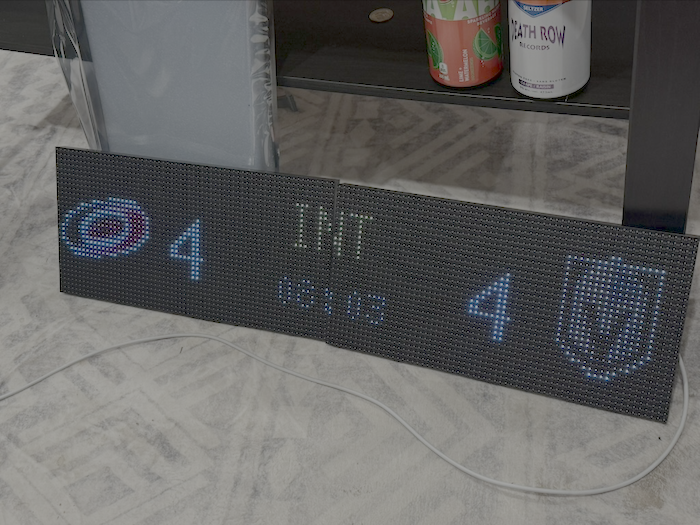
The NHL also forced a handful of small details I had not thought about with baseball. Hockey clocks pause. The live API has a clock.running flag, so I render the clock in amber with a pause icon during stoppages. Between periods the clock disappears entirely from the feed, so the scoreboard shows "INT" plus a countdown to the next period (which the play-by-play feed helpfully provides). And to stop the clock from flickering to blank for a fraction of a second every time the rotation rebuilds, I cache the last-known clock value per game and seed new game objects with it. None of this is hard. All of it is the difference between something that looks like a finished product and something that looks like a science fair entry.
A web page for picking what to watch
The single best feature on the whole device is a small web page that runs on the Pi at port 8080. Open it on your phone, see the day's games with logos and live scores, tap "Watch" on the game you are actually watching, and the scoreboard pins that game and interleaves it into the rotation. Auto-clears itself when the game ends.
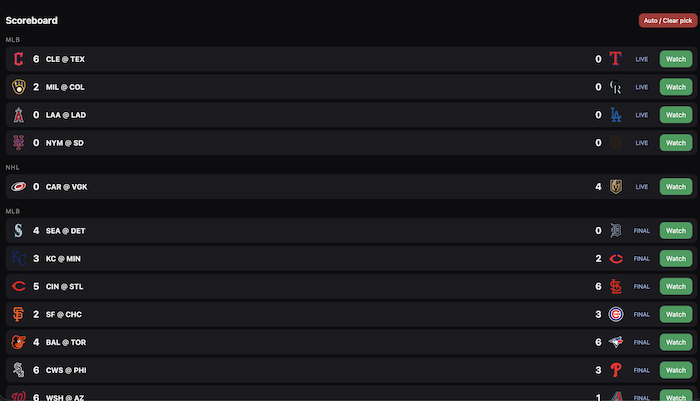
The implementation is delightfully simple. Python's standard library includes ThreadingHTTPServer, which is enough HTTP for this job and has no dependencies. It runs in a background thread inside the scoreboard process and shares state with the display loop through a single lock-guarded object. The display reacts to a "watch this game" pick within about a second, because the main loop notices the shared state changed and rebuilds the rotation immediately. No message bus, no microservice, no Kafka, just a thread and a lock. There is a moral here about reaching for the right size of tool, and I think about it often.
The physical build, including my first OpenSCAD bracket
Two LED panels do not line up perfectly when you just sit them next to each other on a desk. They need a physical bracket to hold them rigidly in plane, so the seam between them disappears at viewing distance. I searched all the usual 3D printing sites and found plently of brackets, but none that were designed for the two panels I had - most were designed for smaller panels from Adafruit.
So I had to make my own, and so I had to take a bit of a side quest and figure out how to make my own STL file for my 3D printer. And so today got to be my first time using OpenSCAD. OpenSCAD is a tool for designing 3D-printable parts by writing code, which is a workflow that immediately appealed to me even though I had never done it before. The actual design was straightforward. The challenge was that I could not find a ruler anywhere in the house when I started measuring the panel mounting holes, and ended up doing it with the side of a hex key and a lot of squinting. Took two or three test prints to get the screw spacing right. The final bracket is a small 3D-printed bridge that mounts to the back of both panels with M3 screws and holds them rigidly aligned. It is exactly the kind of small win that makes a build feel finished.
The whole thing runs as a proper appliance now under systemd, starts on boot, restarts on failure, and gets out of my way.
The path I did not take
Late last the night the Vegas Golden Knights took a 2-1 lead in the Stanley Cup Finals and my friend Scott was over watching the game, and we got into the architecture of this thing.
Scott's pitch was different from what I built, and worth writing down. Instead of a single Pi running everything (display, fetching, web UI, caching, the whole stack), he would build a central command-and-control box that handles all the data work, with display "workers" running CircuitPython on cheap microcontrollers and subscribing to an MQTT broker for updates. The central box does the heavy lifting, decides what each display should show, and publishes the rendered state. Each display is dumb. It listens for "draw this" messages and draws them.
I love this design. I am not going to build it, because I have exactly one of these and the all-in-one-Pi approach is the right tool for that scale. But the moment I have two of these in the house (one in the office, one in the kitchen, maybe one in the basement), Scott's design is the correct one. A central data plane with a few cheap display endpoints is dramatically more maintainable than several independent Pis all making the same API calls and getting the same data. The pub/sub model also makes it trivial to add new sports, new layouts, or new display types later. I have filed it away for the next iteration.
That is one of the reasons I keep doing these projects, by the way. Every build sparks a conversation with somebody who would have done it differently, and the version of the project that lives in my head after that conversation is always a better one than the version I built.
The bottom line
The bottom line is this. I have a small wall-mounted screen now that quietly tells me, all day long, what the Jays and the Leafs are doing without me having to open my phone. In the fall, I'll add NFL support so I can keep tabs on the Packers. It was a weekend of work, a handful of small wins, two embarrassing debugging stories that made me feel like a beginner all over again, and one bracket I designed in OpenSCAD with no ruler. It is not Apple-polished. It is mine.
I think there is a reason that the people who can still build things, at any level, are quietly happier in their day jobs than the people who have outsourced all of their hands-on capacity to other humans. The muscle does not survive disuse. Building things on weekends is how I keep it alive.
Code at matthewmgamble/pi-scoreboard. Next up is the NFL fetcher, which is the same shape as the NHL one. And, eventually, probably, Scott's version of all this. With workers.
Topics: